Call us now :08037103719
 Send Inquiry
 Send Inquiry
Canon Photo Copier Machine
Price 130000 INR/ Unit
MOQ : 1 Unit
Canon Photo Copier Machine Specification
- Type
- Digital Photocopier
- Condition
- New
- Print Speed
- 18 ppm (A4) / 10 ppm (A3)
- Zoom Range
- 50% to 200%
- Scanning Resolution
- 600 x 600 dpi
- Warm-up Time
- Less than 15 seconds
- First Copy Time
- Approx. 7.9 seconds
- Size
- Approx. 622 x 589 x 502 mm
- Weight
- Approximately 26 kg
- Printing Process
- Laser Electrostatic Transfer
- Grayscale
- 256 levels
- Continuous Copying Speed
- Up to 18 copies per minute (A4)
- Power Source
- 220-240V AC, 50/60Hz
- Paper Size
- A4, A3, B4, Legal
- Paper Weight
- 64-90 gsm
- Memory Capacity
- 128 MB
- Connectivity
- USB 2.0 High Speed
- Supported Operating Systems
- Windows, Mac OS
- Display
- LCD Panel
- Noise Level
- Less than 68 dB
- Toner Cartridge Yield
- Up to 2,100 pages (ISO/IEC)
- Monthly Duty Cycle
- Up to 10,000 pages
- Duplex Function
- Manual Duplex
- Paper Tray Capacity
- 250 sheets Input, 80 sheets Bypass
Canon Photo Copier Machine Trade Information
- Minimum Order Quantity
- 1 Unit
- Supply Ability
- 100 Units Per Month
- Delivery Time
- 7 Days
About Canon Photo Copier Machine
A Canon photocopy machine is a multi-functional device for copying, printing, scanning, designed for office use with features like A3 paper support, various print speeds (from 20 to 45+ ppm), and resolutions up to 1200 x 1200 dpi. These machines, such as the imageRUNNER or iR series, offer network connectivity, energy-saving modes, and expandable paper capacityHigh Performance for Busy Offices
With a monthly duty cycle of up to 10,000 pages and a print speed of 18 ppm for A4 paper, the Canon Digital Photocopier maintains workflow efficiency during peak periods. Its large input and bypass trays minimize interruptions for paper refills, and memory capacity of 128 MB ensures smooth processing of larger or complex print jobs.
User-Friendly Design and Operation
The intuitive LCD control panel streamlines copying and printing tasks, while manual duplex capability lets users handle double-sided printing as needed. The device warms up in less than 15 seconds, so productivity is never compromised during busy office hours.
Versatile Connectivity and Compatibility
Equipped with high-speed USB 2.0 connectivity, the copier easily integrates with computers running Windows or Mac OS. This makes it highly adaptable for a variety of office setups, enabling seamless document management and sharing.
FAQ's of Canon Photo Copier Machine:
Q: How does the manual duplex function work on the Canon Digital Photocopier?
A: The manual duplex function allows users to print on both sides of the paper by manually reinserting the paper after the first side is printed. This helps reduce paper consumption and supports eco-friendly printing practices.Q: What types and sizes of paper are supported by this copier?
A: You can use A4, A3, B4, and Legal-sized paper with this copier. It also supports a paper weight range of 64-90 gsm, making it suitable for most standard office documents.Q: When is it recommended to replace the toner cartridge, and what is its yield?
A: The toner cartridge should be replaced when print quality diminishes or when notified by the copier. The standard cartridge yields up to 2,100 pages, based on ISO/IEC standards, depending on usage patterns.Q: Where can I use this copier in my office setup?
A: Thanks to its USB 2.0 connectivity and compatibility with both Windows and Mac OS, this copier integrates effortlessly into various office environments. Its moderate noise level (less than 68 dB) allows it to be placed in shared workspaces without causing significant distraction.Q: What is the process for starting a print or copy job with this machine?
A: To start a job, load paper into the appropriate tray, connect the machine via USB to your computer, and configure your print or copy settings using the LCD panel. The copier will warm up in less than 15 seconds and typically delivers the first copy in about 7.9 seconds.Q: How can I benefit from the copier's memory and speed capabilities?
A: With 128 MB memory and a maximum continuous copying speed of up to 18 copies per minute (A4), large or complex jobs are processed efficiently, reducing delays and boosting overall productivity in demanding office settings.Q: What maintenance is required to ensure the copier continues running smoothly?
A: Routine maintenance includes replacing toner cartridges as needed, keeping trays clean and free of jams, and performing periodic checks suggested in the user manual. Regular maintenance helps prolong the machine's life and maintains consistent output quality.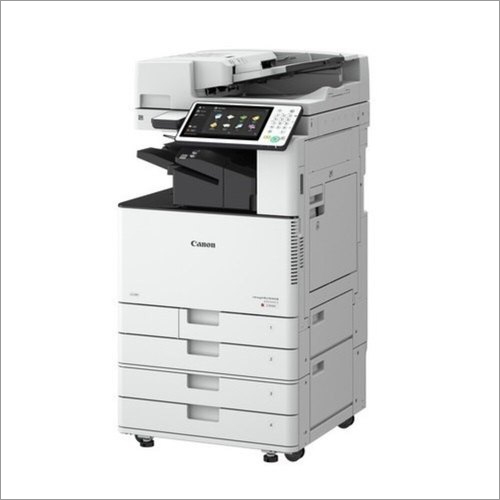
Tell us about your requirement

Price:
Quantity
Select Unit
- 50
- 100
- 200
- 250
- 500
- 1000+
Additional detail
Mobile number
Email

More Products in Photocopy Machine Category
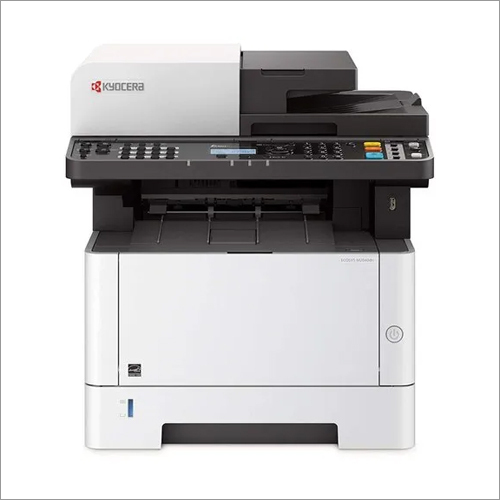
Photo copier Machine
Price 40000 INR / Unit
Minimum Order Quantity : 1 Unit
Type : General
Power Source : Electric
Size : Standard
Condition : New


 Send Inquiry
Our Products
- Xerox Printer Machine
- Epson Printer Machine
- HP Printer Machine
- Kyocera Printer Machine
- Samsung Printer Machine
- TSC Printer Machine
- Copier Machine
- Photocopy Machine
- Scanner Machine
- Business Projector
- LED Monitor
- Projector Parts And Peripherals
- Mouse And Keyboards
- Lenovo Laptop
- Printed Repair Service
- CCTV Camera
- Biometric Attendance System
- Laser Printer Machine

204, Navkar Atlantis, Daulat Nagar Road No 3, Borivali East,Mumbai - 400066, Maharashtra, India

Mr Sandeep Bhurke
(Proprietor)
Mobile :08037103719
 Send Inquiry
Developed and Managed by Infocom Network Private Limited.
